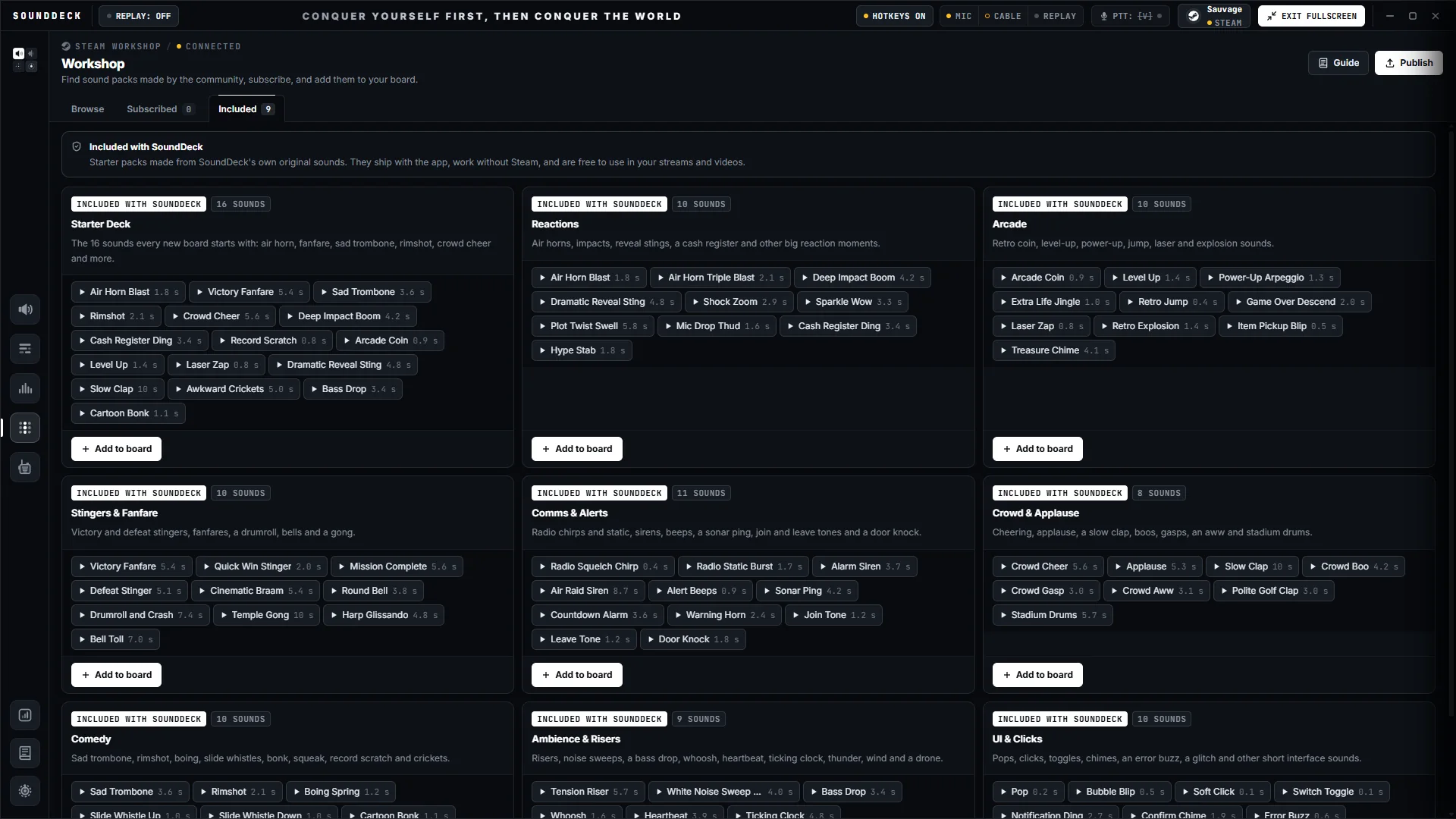
Every sound, one key away.
Bind any key, combo or numpad slot. It fires while your game keeps focus.
 Coming to Steam · Windows
The soundboard, voice changer and instant replay for Windows, with your phone as the deck. Every clip on a key, every voice live, no alt-tab.
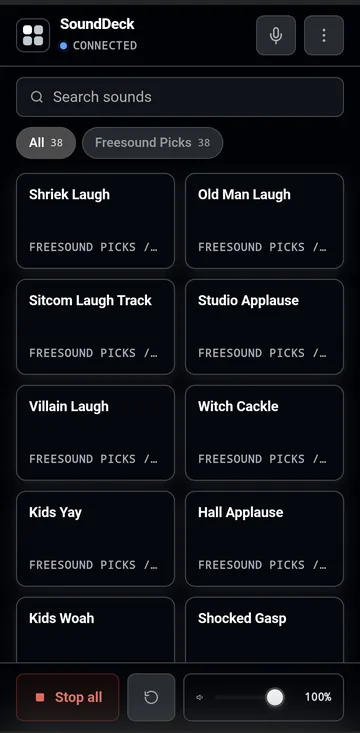
The real app and its phone deck. Screen capture, no sound.
Eight demo sounds, made right here in your browser. In the app, every pad is a sound of yours.
Demo sounds are synthesized in your browser. In the app, all 24 presets reshape your mic live.
Five views of the Windows app and its phone deck. Pick one, or let the tour run.
Eight tools built to work as one: bind, tweak, clip and fire, all while your game keeps focus.
Bind any key, combo or numpad slot. It fires while your game keeps focus.
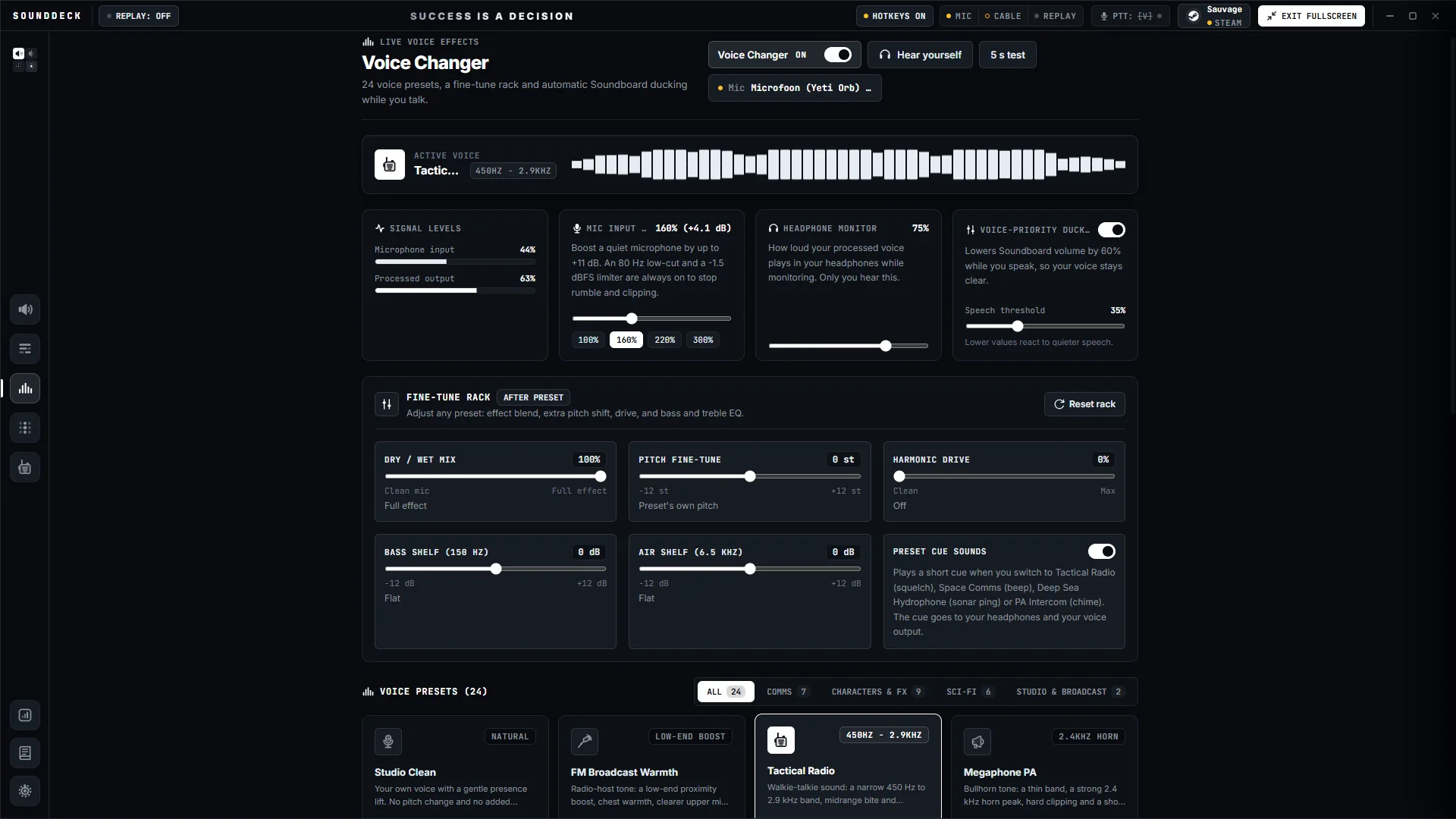
Flip between 24 presets mid-sentence, from Tactical Radio and Robot Voice to Sci-Fi Villain and Cave Goblin. Fine-tune any of them.
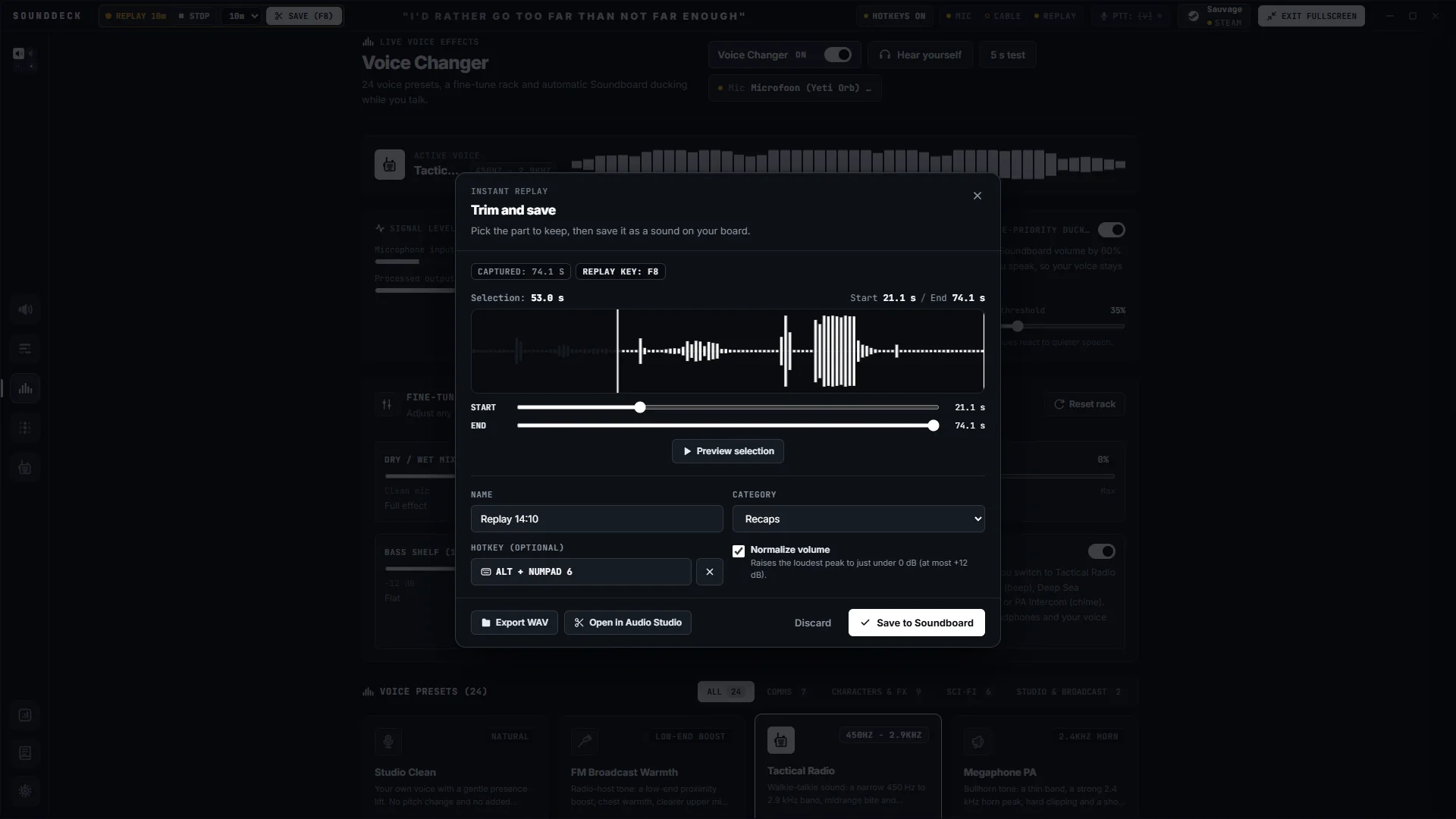
Instant Replay keeps a rolling buffer of your mic, your PC's audio or both. One key saves the moment as a WAV.
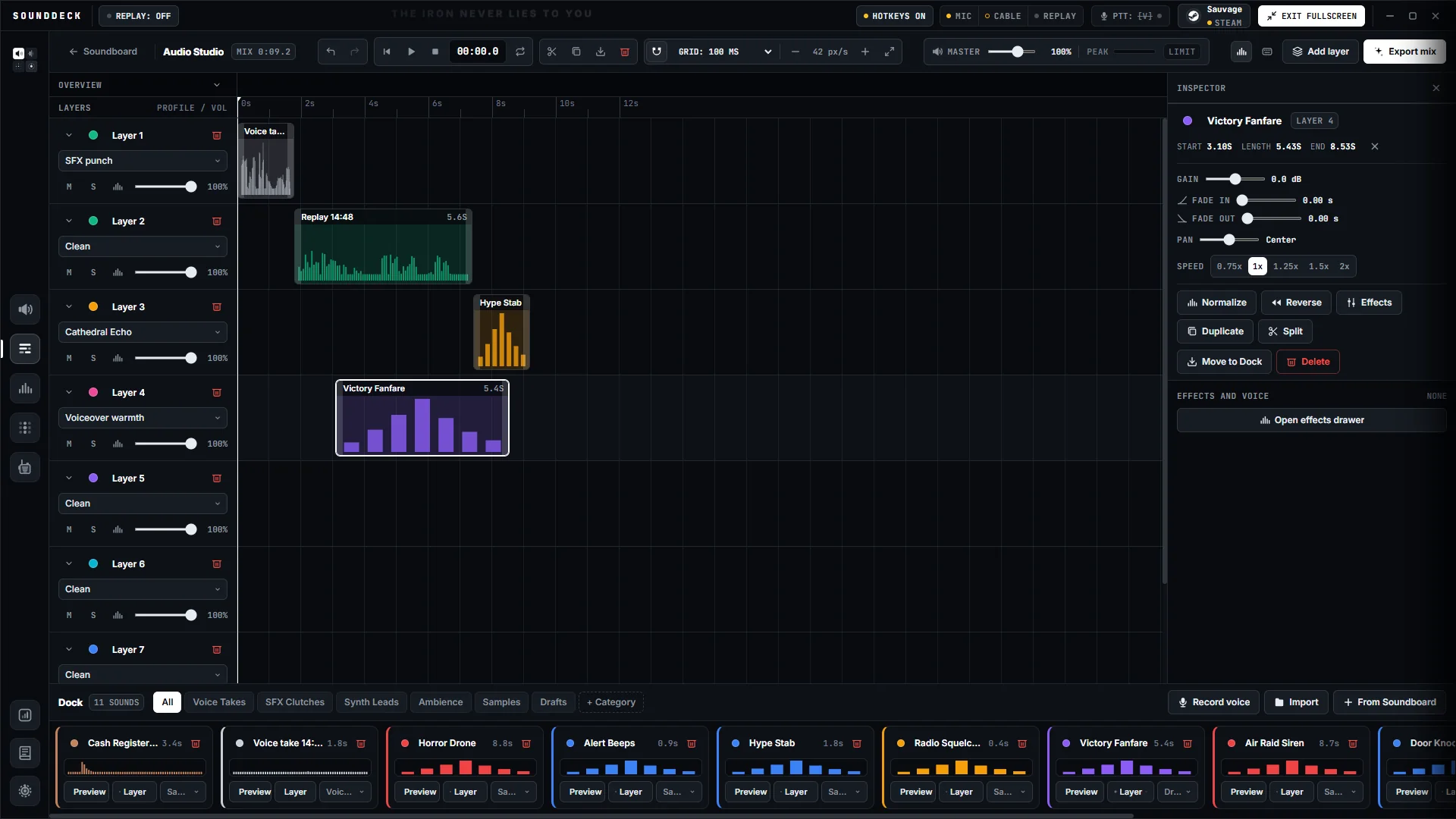
Cut the dead air, stack layers and shape every clip without leaving the app.
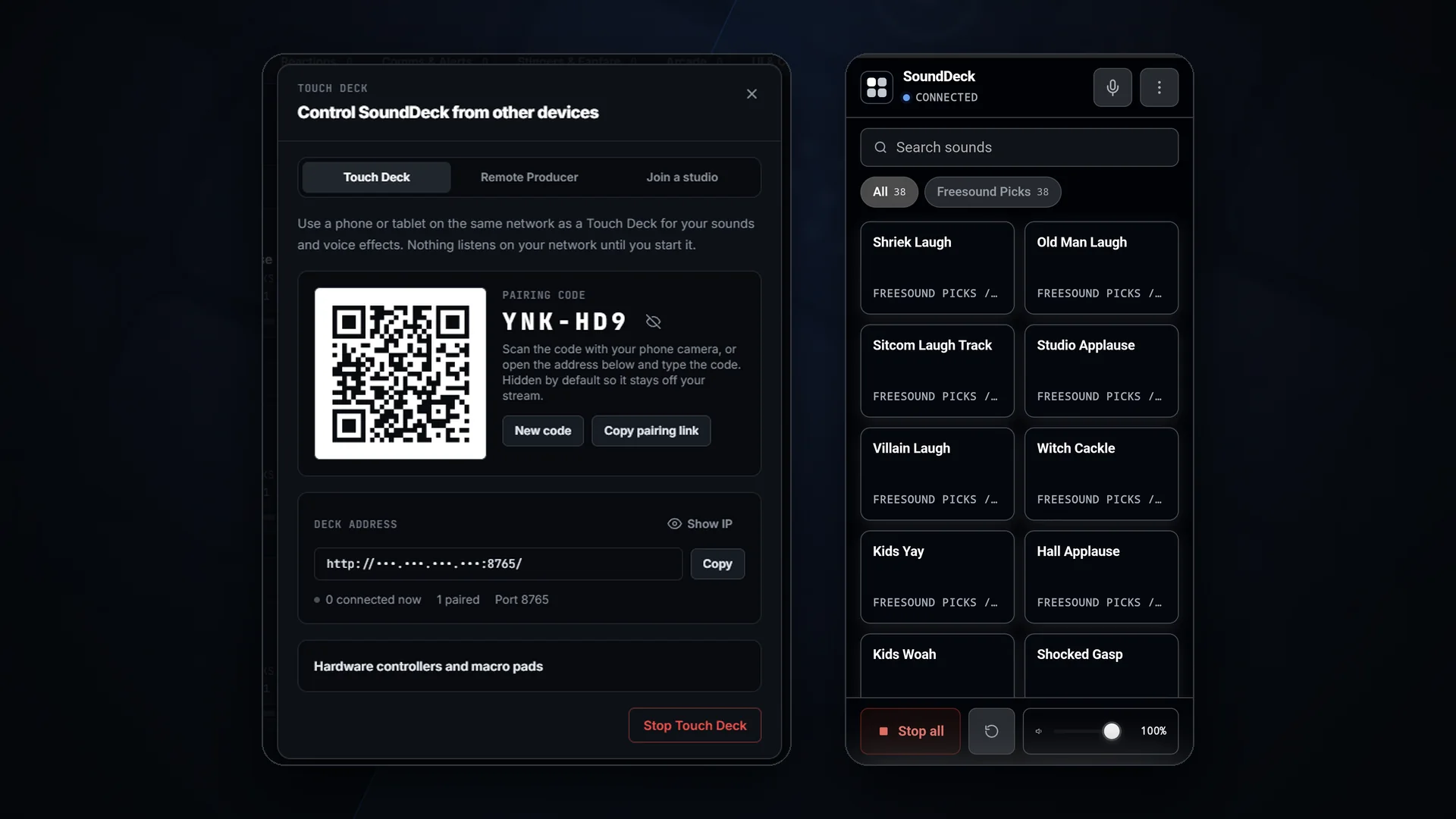
Pair a phone, tablet or laptop over your local network with a code from your PC. It runs in the browser, no app store.
Your voice and your sounds go out through VB-CABLE, VB-Audio's donationware virtual audio cable. Pick CABLE Output as your mic in Discord, TeamSpeak or your game. No game injection.
Voice-priority ducking dips your sounds when you talk. The mic test lets you hear yourself first.
Subscribe to community sound packs and they land on your board. Publish your own: SoundDeck checks format, length, size and loudness on your PC before anything uploads.
Your phone becomes the deck in three steps. Nothing to install on it, no account to make.
Open Touch Deck in SoundDeck and point your phone camera at the QR code.
The phone pairs over your home network and shows your pads in its browser.
The sound plays on your PC, straight into your voice chat. Your game keeps focus.
Scan the QR code and any phone, tablet or laptop on your network becomes a touch deck for SoundDeck, right in the browser. A pairing code from your PC keeps the deck yours.
Pairing and home-screen install unlock with the Steam release.
The web deck preview works today. Day-1 demo keys go out on Discord.
Scan to pair
Your Windows PC
Runs SoundDeck. Every tap plays here, straight into your voice chat.
Fire sounds, stop playback, save a replay or switch voice presets without touching your keyboard.
A producer you approve fires your sounds from their own PC, even off your network, and you can remove them at any time. Intercom chat runs a word filter and allows only built-in SoundDeck stickers, and you can mute or block anyone. Hosting needs SoundDeck running through Steam with a copy you own.
Record four seconds and play it back through three of the 24 presets. It runs in this tab and nothing is uploaded.
A browser preview of three presets. In the app all 24 reshape your microphone live, into Discord or any game with voice chat. Your browser asks for the microphone once, and the recording never leaves this page.
SoundDeck replaces your soundboard, your voice changer and your macro pad. Here is how it stacks up.
| What you get | SoundDeck | Typical soundboard app | Voice changer app | Hardware macro pad |
|---|---|---|---|---|
| Hotkey soundboard | Yes. | Yes | Partly, varies by product | Partly, needs its own software |
| Real-time voice changer | Yes. | No | Yes | No |
| Instant replay of what was just said | Yes. | No | No | No |
| Trim, cut and layer clips | Yes. | Partly, varies by product | No | No |
| Touch control | Yes. | No | Partly, varies by product | Yes |
| Steam Workshop sound packs | Yes. | No | No | No |
| No extra hardware to buy | Yes. | Yes | Yes | No |
Compared with typical products in each category. Individual products vary. On small screens, swipe the table sideways.
SoundDeck installs and updates through Steam on your Windows PC. First-run setup checks for VB-CABLE, VB-Audio's donationware virtual audio cable, and with your consent opens VB-Audio's own installer.
Scan the QR code in SoundDeck and your phone's browser pairs with your PC over your local network. The pairing code locks the deck to devices you pair. A tablet or a spare laptop works too.
Give any sound a global hotkey, pick CABLE Output as your mic in Discord, OBS or your game, then fire from the keyboard or the touch deck.
A standard virtual audio cable. VB-CABLE shows up as a microphone, so any app that lets you choose one can use it.
Its own desktop app. SoundDeck runs in a separate window, and its global hotkeys fire while your game keeps focus.
No game injection. SoundDeck never touches a game's code, memory or files.
Auto push-to-talk is opt-in. It holds your talk key with simulated input while a sound plays, which some anti-cheat systems may flag. It stays off until you accept a notice.
Full hardware requirements will be listed on the Steam store page.
Confirm your address once, then we write exactly twice: when the Steam page opens, and on launch day. No newsletter, no drip campaign, and we never sell or rent the list.
One field. Two launch emails. Leave anytime.
A link to confirm this address is on its way, unless you confirmed it before. Click it within 7 days, or the address is deleted.
Before the first launch email, we send you one link to confirm this address is yours. An address not confirmed within 7 days of that email is deleted.
Saved as
One link to confirm. It proves the address is yours. Not confirmed within 7 days? We delete it.
Wishlist SoundDeck. The store link, plus the release date once it is set.
It's out. The link to get SoundDeck on Steam. That's the last email.
Want in earlier? Playtest and beta keys go to our Discord first. Claim the Steam Launch VIP role there for a ping at launch.
What people ask before they trust a soundboard with their mic. Anything else, a human answers on Discord or by email.
No game injection: SoundDeck never reads or modifies a game's memory, files or processes. Your sounds reach the game through VB-CABLE, a standard virtual audio cable, so to the game it is simply another microphone. The optional Auto push-to-talk presses your talk key with simulated input, which some anti-cheat systems may flag, so it is off by default and asks before you turn it on. Server and league rules on soundboards still apply.
Your sounds, hotkeys, recordings and settings stay on your PC, and the app sends us no analytics or telemetry. If you join the launch list, this site keeps your email, the role you picked and the page you signed up on, plus the IP address, browser and time of signup so we can stop spam. You confirm the address once by email, and an address that is never confirmed is deleted. One email to [email protected] gets it deleted. Full details, including our short-lived server logs, are in the privacy policy.
Both are announced with the Steam store page. Until then, we won't quote a date or a price. Join the launch list and the news reaches you by email.
SoundDeck is a desktop app for Windows 10 and 11; there is no Mac version. Your phone, tablet or a second laptop works as the remote: the companion deck runs in its browser over your local network, with nothing to install from an app store.
Yes. SoundDeck sends your mic and your sounds through VB-CABLE, a donationware virtual audio cable by VB-Audio Software. Select CABLE Output as the input device in Discord, TeamSpeak or your game's voice settings, and your squad hears both. First-run setup checks for VB-CABLE and, with your consent, opens VB-Audio's own installer. If Discord's noise suppression filters out your sounds, switch it off.
Join our Discord. Day-1 demo keys go out there when SoundDeck launches on Steam. Add your email to the launch list as well, so the launch news reaches you directly.
No. Global hotkeys fire sounds while your game keeps focus, and Instant Replay saves the last moments of voice and audio with one key. Prefer touch? Pair your phone and use it as a wireless deck next to your keyboard.
SoundDeck ships with 78 original sounds made for it, free to use in your streams and videos, and batch-imports your own MP3, WAV, OGG, FLAC, M4A and Opus files. Once it is on Steam, the Workshop adds community soundpacks: subscribe and the sounds land on your board. To publish your own, SoundDeck checks format, length, size and loudness on your PC first, and the pack stays hidden until you have accepted Steam's Workshop agreement.
VIP slots are open. Claim yours and get first access when SoundDeck lands on Steam.