
Your sounds in Discord. Six steps, done once.
SoundDeck reaches Discord through a virtual microphone called VB-CABLE. Set it up once, and every call, game and voice app can hear your sounds and your voice.
- One-time setup
- Built-in Audio check
- Games and TeamSpeak too
The short version
Discord only listens to one input device. SoundDeck mixes your voice and your sounds and sends them into CABLE Input. In Discord, set your Input Device to CABLE Output, turn Noise Suppression off, and keep SoundDeck running while you talk.
From install to your first sound. Six steps.
Do them in order. The Audio check in step five tells you which one to revisit if something is off.
-
Install VB-CABLE
Steam installs VB-CABLE, a free virtual audio cable by VB-Audio (donationware, www.vb-cable.com), together with SoundDeck. Restart your PC when the installer finishes. CABLE Input and CABLE Output then appear as audio devices.
-
Pick your devices in SoundDeck
Open SoundDeck, then Settings, then Devices. Choose three things:
- Microphone: your real headset or desk microphone.
- Headphones: where you listen to your sounds.
- Broadcast output: CABLE Input. SoundDeck selects it for you when it finds VB-CABLE.
SettingsDevices
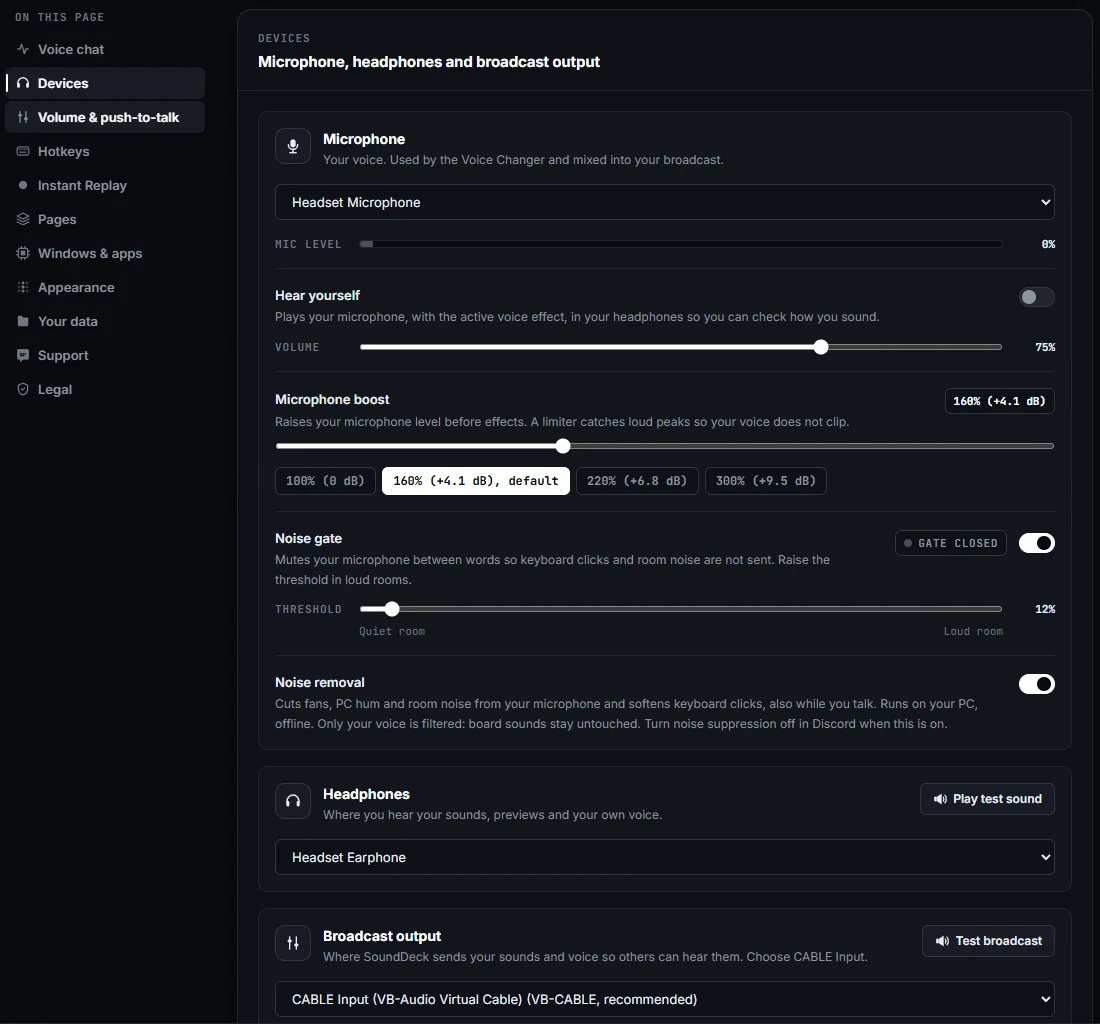
Settings, Devices. Your device names will differ; Broadcast output stays on CABLE Input. -
Point Discord at CABLE Output
In Discord, choose the virtual cable as your microphone. Discord now hears your voice and your sounds as one input.
User SettingsVoice & VideoInput DeviceCABLE Output (VB-Audio Virtual Cable)
-
Turn Noise Suppression off in Discord
On the same Discord screen, set Noise Suppression to None. Discord's filters treat sounds and changed voices as background noise and cut them. SoundDeck already cleans your microphone itself, so you lose nothing.
User SettingsVoice & VideoNoise SuppressionNone
-
Run the Audio check
In SoundDeck, open Settings, then Voice chat. The Quick check plays nothing and tests VB-CABLE, your devices, your microphone and feedback loops. The full check also plays a quiet one-second tone into CABLE Input, so anyone listening on CABLE Output, for example a Discord call, hears it.
Each line shows Passed or what to fix, with a Fix button where SoundDeck can do it. It cannot read Discord's settings, so the last line, Discord input device, is a reminder of steps three and four.
SettingsVoice chat
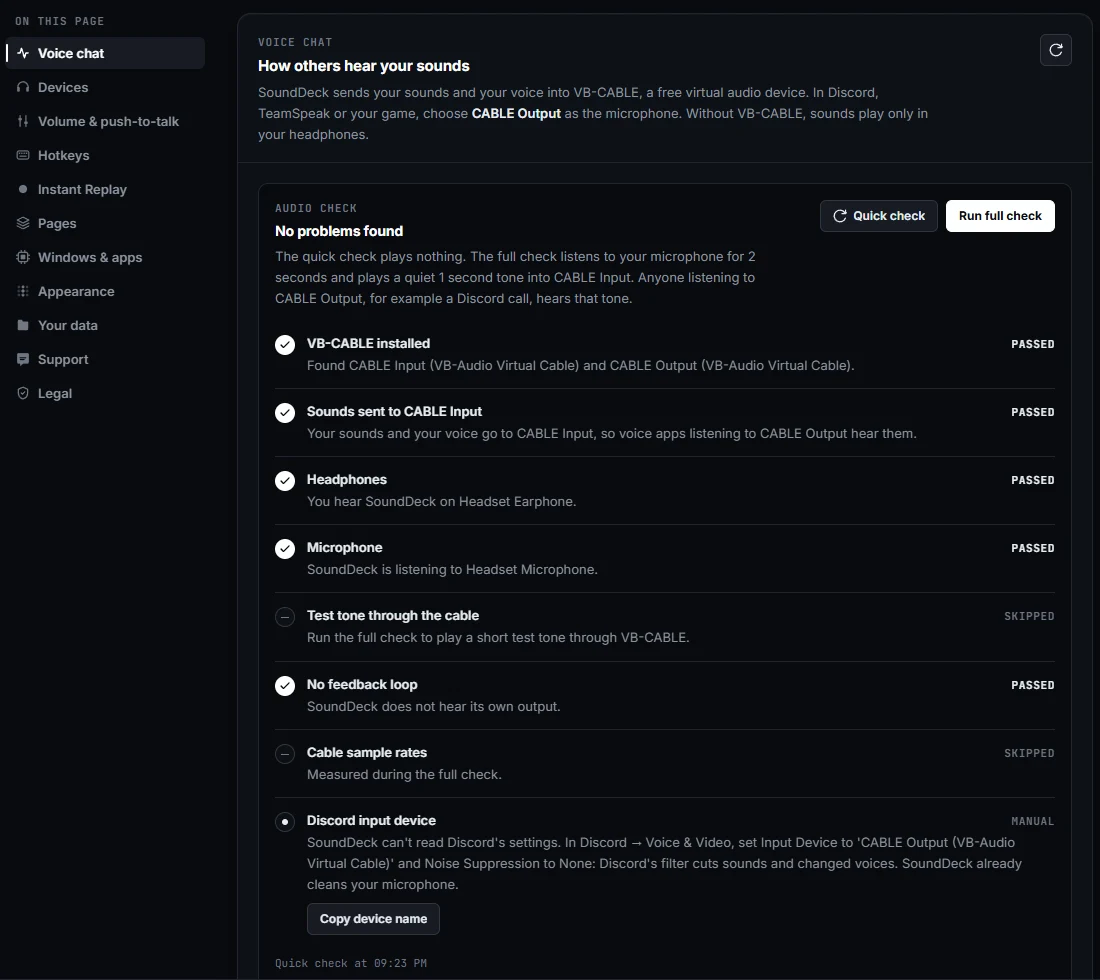
Settings, Voice chat. The Audio check after a quick check on a working setup. -
Join a call and play a sound
Join a voice channel, then click a sound or press its hotkey. You hear it in your headphones, and everyone in the call hears it through CABLE Output. Keep SoundDeck running: your voice travels through it too.
Keep your headset as the Windows defaultIf CABLE Input becomes your default playback device, everything your PC plays is sent to your friends.
Games and TeamSpeak work the same wayChoose CABLE Output as the microphone, capture or input device in their audio settings.
No game injectionTo a game or Discord, SoundDeck is just another microphone. It never hooks into a game.
VB-CABLE by VB-Audio Software (vb-cable.com) — donationware, all participations are welcome. vb-audio.com/Cable (info and donations), opens in a new tab
Something is not working?
Run the Audio check first. These are the fixes for what it finds. Still stuck? A human answers on Discord or by email.
Why do my friends hear nothing?
Check that Discord's input is CABLE Output, that Broadcast in SoundDeck Settings is CABLE Input, and that SoundDeck is running.
Why do friends hear my sounds but not my voice?
Pick your real microphone in SoundDeck Settings. Make sure Windows allows microphone access: Windows Settings, Privacy & security, Microphone, then turn on access for desktop apps.
Why do friends hear all my PC audio?
CABLE Input is set as your Windows default playback device. Set your headphones back as the default.
Why do I hear my own voice?
Turn off Hear yourself in the Voice Changer.
Why do no CABLE devices show up?
Restart your PC after installing VB-CABLE. If they are still missing, run VB-Audio's installer again.
Why do my sounds crackle or my voice sound robotic?
Mismatched sample rates between CABLE Input and CABLE Output can cause it. In the Windows Sound Control Panel, give both the same format under Properties, Advanced. The full Audio check measures both rates and tells you.
Why does my hotkey do nothing?
Hotkeys may be paused: press your Hotkeys on/off key (Ctrl + Shift + H by default, changeable in Settings). Another program may already use that key, or the numpad is in Typing safe mode and needs Alt.
Do I have to repeat this setup for every call?
No. It is a one-time setup per PC. Discord keeps your Input Device, and SoundDeck keeps your devices. Only if you switch headsets or microphones do you pick the new device in SoundDeck Settings, Devices.
Does SoundDeck have to stay open while I talk?
Yes. Your voice travels through SoundDeck on its way into CABLE Input, so it must be running for your voice to reach Discord and any other app that uses CABLE Output as its microphone.
What does the Audio check actually test?
VB-CABLE, where your sounds are sent, where you hear SoundDeck, your microphone, feedback loops and, in the full check, a quiet test tone through the cable and the cable's sample rates. It cannot read Discord's settings, so it reminds you which Discord options to pick.
Know the day it hits Steam.
Confirm your address once, then we write exactly twice. No newsletter, no drip campaign, and we never sell or rent the list.
Confirm. One link that proves the address is yours. Not confirmed within 7 days? We delete it.
Steam page live. The store link to wishlist SoundDeck, plus the release date once it is set.
Launch day. The link to get SoundDeck on Steam. That is the last email.
Want in earlier? Playtest and beta keys go to our Discord first. Claim the Steam Launch VIP role there for a ping at launch.
Get the launch emails
One field. Two launch emails. Leave anytime.
Check your inbox.
A link to confirm this address is on its way, unless you confirmed it before. Click it within 7 days, or the address is deleted.
You're on the list.
Before the first launch email, we send you one link to confirm this address is yours. An address not confirmed within 7 days of that email is deleted.
Saved as